Build and deploy
UI kit
Framework-free custom elements for the screens every multiplayer project needs: invites, a room browser, a room panel, a lobby, voice settings and voice chat, a network indicator and a join loader, sharing one theme and opening inline or as a dialog.
The UI kit is a set of custom elements for the screens a project without a backend needs, and that are easy to get subtly wrong: inviting friends, finding a room, a lobby, voice controls, a loading state and a sign that the connection is bad. Each works in plain HTML and in any framework that renders custom elements, renders in a shadow root, is built for phones as well as desktops, and shares one theme with the others.
| Element | Shows | Entry |
|---|---|---|
<irt-invite> |
The join code, a copy button for the share link, and optionally a QR code | @irt/client/ui/invite |
<irt-room-browser> |
The project’s public rooms of a type, with players out of max, and refresh, join, create and quick join | @irt/client/ui/room-browser |
<irt-room-panel> |
An invite, the connection status, the players, a name field, and create, join and quick join | @irt/client/ui/room-panel |
<irt-lobby> |
An invite, the lobby’s players, ready flags and leader, ready, start and cancel, the countdown and failures | @irt/client/ui/lobby |
<irt-voice-settings> |
Microphone on or off, devices, an input level meter, push-to-talk and its key | @irt/client/ui/voice-settings |
<irt-voice-chat> |
The other players in voice, each with a speaking indicator, a volume slider and a mute button | @irt/client/ui/voice-chat |
<irt-network> |
Signal bars and the round trip; opened, the transport, round trip, jitter and traffic | @irt/client/ui/network |
<irt-join-loader> |
A small animation while joining, then how long it took | @irt/client/ui/join-loader |
Each element below has a screenshot in the light and dark defaults, and the gallery runs them all live in the browser, with a made-up room, lobby and voice.
@irt/client/ui defines them all and exports open. Import an
element’s own entry to pay only for what you use. @irt/client/panel
and @irt/client/lobby still define the room panel and the lobby.
Coming from the room panel page: <irt-lobby> now holds an
<irt-invite>, as el.invite, in place of its name field and create
and join buttons, and the --irt-panel-* custom properties are now the
--irt-* properties every element shares, under Theming.
Every element takes its client, or its voice, as a property, its text as
labels, and fires events that bubble and cross the shadow root.
Usage
The room panel finds the room and the project connects to it: on
room-join, create the RoomClient and give it to the panel, which
then shows its status and players. The network indicator and join
loader take the same client.
<irt-room-panel router="wss://eu.irt.io" project="my-project" qr></irt-room-panel>
<irt-join-loader></irt-join-loader>
<irt-network style="position: fixed; top: 8px; right: 8px"></irt-network>
<script type="module" src="./main.js"></script>
// web/main.ts
import { type ReadyRoomClient, RoomClient } from "@irt/client";
import "@irt/client/ui";
import { schema } from "./schema.js";
const panel = document.querySelector("irt-room-panel")!;
const loader = document.querySelector("irt-join-loader")!;
const network = document.querySelector("irt-network")!;
panel.addEventListener("room-join", (e) => {
panel.client?.leave();
const client = new RoomClient({ router: panel.router, project: panel.project, room: e.detail.room, schema });
panel.client = loader.client = network.client = client;
client.ready.then(() => start(client as ReadyRoomClient<any, any, any>), () => {});
});
function start(client: ReadyRoomClient<any, any, any>): void {
client.onTick((tick) => (document.title = `Round ${client.state.round} (tick ${tick})`));
}// web/schema.ts
import { defineSchema, entity } from "@irt/client";
export const schema = defineSchema({ state: entity("scoreboard", { round: "u16" }) });Give the elements a client made with new RoomClient rather than
awaiting connect, so they show the connection while it’s still
connecting or starting the room, and why it failed if it does.
Inline or dialog
Placed in the page, an element renders where it is. With the dialog
attribute it renders inside a <dialog> in its shadow root, closed
until show(), with a close button. show() opens it with
showModal(), so focus stays in it, the page behind is inert and Escape
closes it; focus returns to where it was. close() closes it, and the
element fires close.
For a one-off dialog, open appends the element to <body> as a
dialog, sets the properties given, shows it, and removes it on close.
It takes any element but <irt-network>:
// web/browse.ts
import { open } from "@irt/client/ui";

const browser = open("irt-room-browser", { router: "wss://eu.irt.io", project: "my-project" });
browser.addEventListener("room-join", (e) => {
  browser.close();
  console.log("joining", e.detail.room);
});
<irt-network> is the exception: it’s small enough to sit in a corner
of the canvas, and clicking it opens its details in a popover.
show() and close() open and close that popover, and it takes no
dialog attribute.
The elements
<irt-invite>
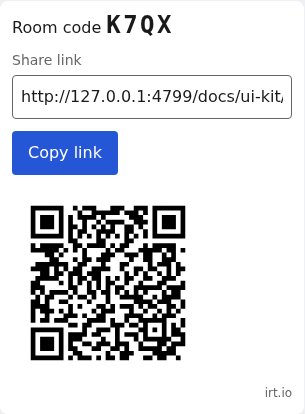
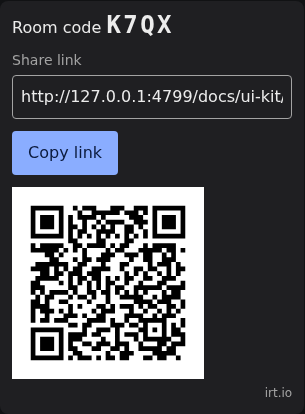
The room’s join code and share link, with a copy button, and with the
qr attribute a QR code for the link. The link is the current page
with ?code=<join code>, or ?room=<room ID> for a room without a
code, such as one from quick join. When the page opens with either, the
invite looks the room up and fires room-join, so the link a friend
scans lands in the room. The QR code is drawn as SVG by an encoder in
the package.
| Attribute or property | |
|---|---|
router, project attributes |
The router address, as for connect, and the project’s slug, to look up a code |
qr attribute |
Show a QR code for the share link |
room, code properties |
The room ID and join code shown and linked to |
link property |
The share link, read-only |
Event: room-join, { room: string; joinCode: string | null }.
Labels: code, link, copy, copied, copyFailed (the browser
refused the clipboard), qr (the QR code’s accessible name) and
close. Parts: room, code, share-link,
copy, qr and error. --irt-qr-fg and --irt-qr-bg, #000 and
#fff by default, color the QR code; keep them dark on light so every
phone can scan it.
<irt-room-browser>
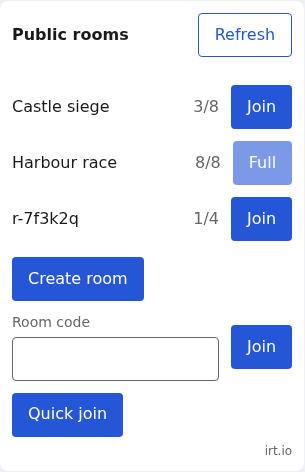
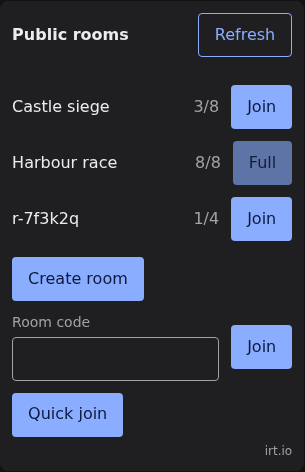
The project’s active public rooms of its type attribute, else of every
type, each with its players out of its maximum and a join button,
“Full” and disabled at the maximum. A room’s meta.name, when it’s a
string, labels it, else its ID. Below the list are the create, join by
code and quick join buttons the room panel has; the browser creates
public rooms of its type and quick joins its type.
listPublic is limited to 60 requests a minute per address, so the
browser lists the rooms when it’s added to the page, or for a dialog
when it opens, and when the player presses refresh, never on a timer.
Call refresh() to list them again yourself.
| Attribute or property | |
|---|---|
router, project attributes |
As for the invite |
type attribute |
The room type to list, create and quick join |
rooms property |
The rooms last listed, read-only; undefined before the first list |
Event: room-join, with joinCode null for a room joined from the list.
Labels: title, refresh, loading, empty, players (with {n}
and {max}), joinRoom, full, create, joinCode, join,
quickJoin and close. Parts: header, title, refresh, empty,
rooms, room, room-name, room-players, join-room, actions,
create, join-form, join-code, join, quick-join and error.
<irt-room-panel>
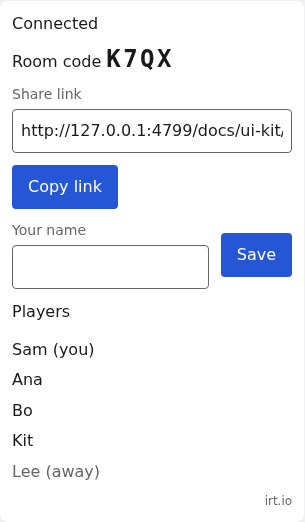
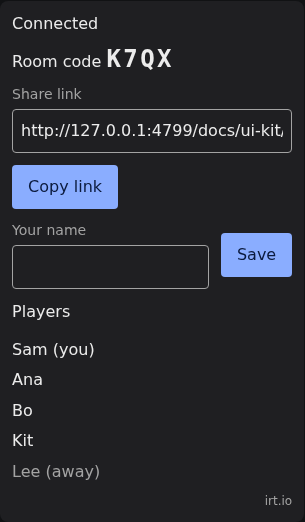
The whole room screen as one element: an <irt-invite>, the connection
status, the players in the room from presence,
a name field for the local player, and the create, join by code and
quick join buttons.
- Create room calls
createRoomwithjoinCode: true, so the room can be shared without giving out its ID. Join looks the code up withjoinByCode, in any case. Quick join callsquickJoin. Each firesroom-joinwith the room ID and join code. - Status is one of connecting, waking, open, reconnecting and closed, with the close reason, in a live region screen readers announce.
- Players each show their name,
(you)for the local player and(away)while disconnected, for the 10 seconds before their entry leaves. - Settings. The buttons don’t know the project’s settings. When one
is off, as
players.quickJoinis by default, the router’s 403 message is shown under the buttons. Hide a button you don’t use withirt-room-panel::part(quick-join) { display: none; }.
The buttons are hidden while the panel has a client that isn’t closed.
| Attribute or property | |
|---|---|
router, project attributes |
As for the invite |
qr attribute |
Passed to the invite |
client property |
The RoomClient to show; set it on room-join |
room, code properties |
The invite’s; the panel sets them, or set them for a room found another way |
invite property |
The <irt-invite> inside |
playerName property |
The saved name, read-only |
link property |
The share link, read-only |
Events: room-join, and name-change with { name: string }, trimmed,
at most 64 characters.
Labels: the invite’s and the buttons’, and idle, connecting,
waking, open, reconnecting, closed (followed by : and the
reason), name, saveName, players, you, away and unnamed.
Parts: status (with data-status), invite, the invite’s room,
code, share-link, copy and qr, name-form, name, save-name,
players-section, players-label, players, player (also you and
away), the buttons’ parts as in the room browser, and error.
Names. A presence entry’s name is set by the room, and its
status by the player, so the panel puts the name the player types in
its presence status as name, next to any other fields the project
keeps there. It saves the name in localStorage under
irt.name.<project> and sends it again whenever the client connects or
resyncs. Each player is shown by the room’s name when it has set one,
else by the name in their status, else as “Player”. A room that wants
a say checks the claimed name and makes it the presence name, which
then wins:
// src/room.ts
import { defineRoom } from "@irt/room";

export default defineRoom({
  onTick(room) {
    for (const p of room.presence) {
      const claimed = (p.status as { name?: unknown } | null)?.name;
      if (typeof claimed !== "string") continue;
      const name = claimed.replace(/[^\p{L}\p{N} _-]/gu, "").slice(0, 32);
      if (name && name !== p.name) room.presence.set(p.player, { name });
    }
  },
});
A project with player tokens can pass the name in the token’s meta
instead, which is the presence name from the start; see
Player tokens.
<irt-lobby>
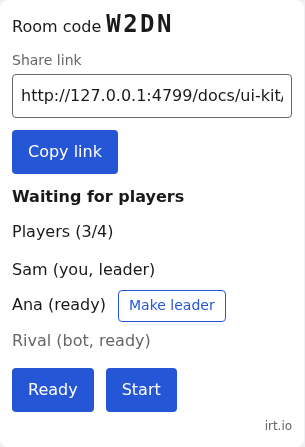
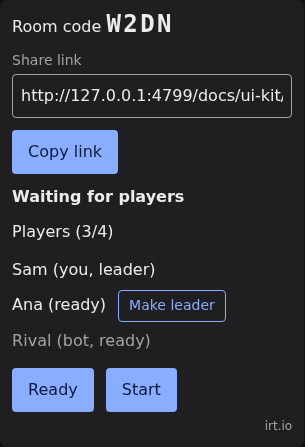
A lobby: an <irt-invite> for the code, share
link and QR code, the lobby’s players with who is ready and who leads,
a ready button, start and cancel buttons for the leader, the countdown,
and why a handoff failed. The leader also gets a “Make leader” button
beside each other connected player, which passes the lead with
client.lead. Give it the lobby’s client, and take the new room’s
client from its handoff event; see
the lobbies guide.
| Attribute or property | |
|---|---|
router, project, qr attributes |
Passed to the invite |
client property |
The lobby’s RoomClient |
invite property |
The <irt-invite> inside, for its room and code and its room-join |
Event: handoff, with the client’s Handoff.
Labels: the invite’s, and waiting, countdown (with {n} for the
seconds left), handingOff, ready, notReady, isReady, start,
cancel, you, bot, leader, makeLeader, unnamed, moving,
players and failed, an object with a text for each handoff failure.
Parts: invite, lobby, phase (with data-phase), players-label,
lobby-players, lobby-player (also you, bot, is-ready and
leader), make-leader, ready, start, cancel and failed.
<irt-voice-settings>
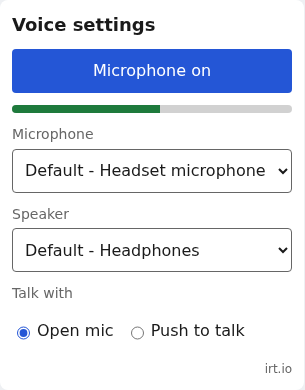
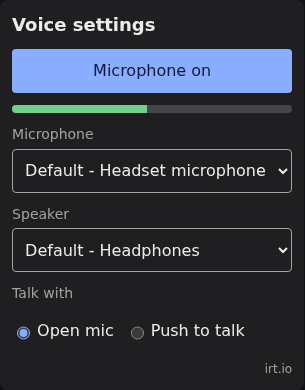
The local player’s voice controls, for a Voice from
joinVoice: the microphone on or off,
the microphone and speaker devices, an input level meter, and
push-to-talk or open mic with the push-to-talk key. The speaker select
shows only where the browser can pick an output device (setSinkId).
Device names appear once the player has allowed the microphone. Set the
voice as its voice property, and keep the element in the page with
the dialog attribute, opening it with show():
<irt-voice-settings dialog></irt-voice-settings>// web/voice.ts
import { joinVoice } from "@irt/client/voice";
import "@irt/client/ui/voice-settings";
const settings = document.querySelector("irt-voice-settings")!;
settings.voice = joinVoice(client);
document.querySelector("#voice-settings")!.addEventListener("click", () => settings.show());While the element is in the page and push-to-talk is on, it binds the
push-to-talk key, key, a KeyboardEvent.code (default KeyV), and
ignores it while focus is in a text field. It keeps binding it while its
dialog is closed, which is why it stays in the page rather than coming
from open(), which removes it on close. The player picks another key
with the key button; Escape cancels picking one. The key the player
picks is kept in localStorage under irt.pttKey.<project>, for the
voice’s project, and wins over key, which sets the key for players
who haven’t picked one. Where the browser blocks storage it lasts for
the page.
When the microphone fails to start, whether the player turned it on or
it was on when voice joined, it’s turned off again and the element says
why: micBlocked when the browser refused it, else micFailed. The
voice reports the same failures on its micError event.
Labels: title, micOn, micOff, micBlocked (the browser refused
the microphone), micFailed, input, output, defaultDevice,
level, mode, openMic, pushToTalk, key, pressKey and close.
Parts: title, mic (with aria-pressed), error, level,
level-bar, input-field, input, output-field, output, mode,
key-field, key, close and link.
<irt-voice-chat>
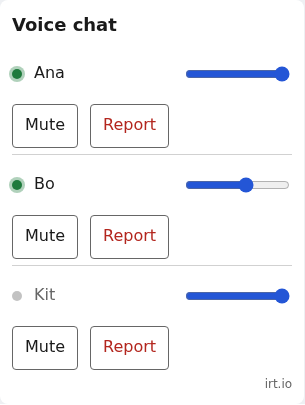
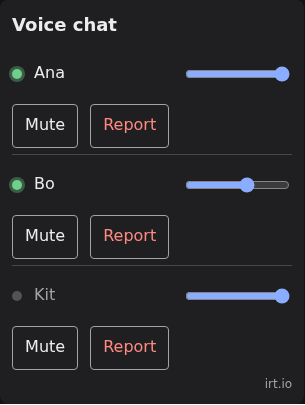
The other players on the voice server, from the voice’s participants,
each by their presence name, with a speaking indicator, a volume slider
and a mute button. A player in the room who hasn’t joined voice isn’t
listed. Volume and mute
are the local player’s own, through the voice’s setVolume and
setBlocked: a volume from 0 to 1 multiplies the room’s distance
attenuation, and a muted player is unsubscribed, so they cost no
bandwidth. Both are kept per project in localStorage by player ID, a
volume once the slider is let go, so a player muted in one room stays
muted in the next. Set its voice and
its client, whose presence names the players.
When the page listens for report on the element, each player also gets
a report button, and the event carries { player, name }. IRT keeps no
reports and does no moderation: what a report does is up to the project.
// web/voice-chat.ts
import { joinVoice } from "@irt/client/voice";
import "@irt/client/ui/voice-chat";

const chat = document.querySelector("irt-voice-chat")!;
chat.client = client;
chat.voice = joinVoice(client);
chat.addEventListener("report", (e) => void fetch("/api/report", { method: "POST", body: JSON.stringify(e.detail) }));
Event: report, with { player, name }.
Labels: title, empty, unnamed, speaking, muted (their
microphone is off), volume, block, unblock, report and close.
Parts: title, players, player (with data-player, and
data-speaking, data-muted and data-blocked while they hold),
speaking, name, volume, block (with aria-pressed), report,
empty, close and link.
<irt-network>
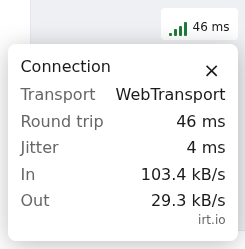
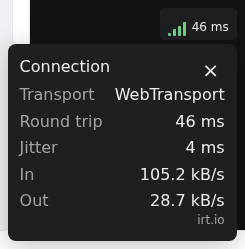
Signal bars and the round trip, for a corner of the canvas: 4 bars under
80 ms, 3 under 150, 2 under 250, 1 above, and none while reconnecting.
Clicked, it opens a popover with the transport, WebTransport or
WebSocket, the round trip, the jitter and the traffic in and out per
second, measured from client.stats over one-second windows. Set its
client property.
Labels: signal (the bars’ accessible name, with {n}), offline,
details, transport, rtt, jitter, in, out, kinds, an object
with webtransport, websocket and unknown, and close. Parts:
indicator (with data-signal), bars, bar (also lit),
rtt-short, details, title, transport, rtt, jitter, in,
out, close and link.
<irt-join-loader>


A small animation while its client connects, reconnects or waits for
the room to start, then “Joined in 180 ms”, or “Room started in 1.4 sec”
when the router started or woke the room on the way, from
client.joinTime. The message fades after 3 seconds, and the loader
disappears if the client closes. Set its client property.
Labels: connecting, waking, reconnecting, joined and started
(each with {time}), and close. Parts: spinner and text, and
frame with data-state: idle, joining, joined or faded.
Labels
Each element’s English text is its default…Labels export, such as
defaultRoomPanelLabels. Set labels to replace any of them by key;
the rest stay English. Numbers and times are formatted with
Intl.NumberFormat in the page’s language, from <html lang>, else
the browser’s.
// web/labels.ts
import type { RoomPanelLabels } from "@irt/client/ui";

const french: Partial<RoomPanelLabels> = {
  idle: "Pas dans une salle",
  connecting: "Connexion…",
  waking: "Démarrage de la salle…",
  open: "Connecté",
  reconnecting: "Reconnexion…",
  closed: "Déconnecté",
  create: "Créer une salle",
  join: "Rejoindre",
  quickJoin: "Partie rapide",
  name: "Ton nom",
};

if (navigator.language.startsWith("fr")) document.querySelector("irt-room-panel")!.labels = french;
Close reasons and the router’s errors stay in English.
Theming
The elements read one set of custom properties, inherited through their
shadow roots, so set them once on :root or on any ancestor:
| Custom property | Light default | Dark default | |
|---|---|---|---|
--irt-bg, --irt-fg |
#fff, #1a1a1a |
#1f1f22, #ececec |
Background and text |
--irt-muted |
#666 |
#a3a3a3 |
Labels, away players, the irt.io link |
--irt-accent, --irt-accent-fg |
#2456d6, #fff |
#8aadff, #0b1a3d |
Buttons and focus rings |
--irt-danger |
#b3261e |
#ff8a80 |
Errors, one signal bar |
--irt-good, --irt-warn |
#1e7a3c, #9a5b00 |
#6fd08c, #f2b84b |
Signal bars and indicators |
--irt-radius, --irt-gap |
8px, 12px |
||
--irt-font |
16px/1.4 system-ui, sans-serif |
A font shorthand |
The defaults follow prefers-color-scheme. Each element sets
color-scheme: light dark, so its native controls and dialog backdrop
match the system; a project with its own dark theme on a light system
sets color-scheme: dark on the elements as well.
Past what the properties cover, style any part with ::part:
:root {
  --irt-bg: #14161c;
  --irt-fg: #f2f2f2;
  --irt-accent: #ffb000;
  --irt-accent-fg: #14161c;
}
irt-room-panel::part(player you) { font-weight: 600; }
Every element with a dialog also has the parts frame, dialog and
close.
The irt.io link
Every element has a small “irt.io” link in its bottom-right corner, in
--irt-muted, opening https://irt.io in a new tab; the network
indicator has it in its popover. It has the part link, and can’t be
turned off.
Accessibility
Every field has a label, the order of focus follows the order on screen,
and everything works from the keyboard. Status changes are announced
through live regions and errors as alerts. The QR code is an image
labelled by labels.qr, and the share link beside it can be copied for
players who can’t scan it. Buttons and fields are at least 44 pixels
tall, apart from the network indicator.
Testing
The elements need a DOM. In Vitest, run their tests under jsdom with a
// @vitest-environment jsdom comment at the top of the file, and give
them a client from @irt/testing:
// web/panel.test.ts
// @vitest-environment jsdom
import "@irt/client/ui/room-panel";
import { defineRoom } from "@irt/room";
import { testRoom } from "@irt/testing";
import { expect, it } from "vitest";

it("lists the players in the room", async () => {
  const room = testRoom(defineRoom({ onJoin: (room, c) => room.presence.set(c.player, { name: c.player.toUpperCase() }) }));
  const alice = await room.connect({ player: "alice" });
  await room.connect({ player: "bob" });
  const panel = document.createElement("irt-room-panel");
  document.body.append(panel);
  panel.client = alice.client;
  await new Promise((r) => setTimeout(r, 0));
  const players = Array.from(panel.shadowRoot!.querySelectorAll("[part~=player]"), (li) => li.textContent);
  expect(players).toEqual(["ALICE (you)", "BOB"]);
});
jsdom has no showModal, so a test that opens a dialog stubs it.